FairGo128 Fic-Service
Updated - October 30th, 2011

File Integrity Check Service (Fic-Service)

Welcome to the File Integrity Check (Fic) Service!

The system files on your computer and device should be monitored and checked for integrity from time to time. This Fic application and service can help you effectively.

95% of computer users know about computer file system.

Every file in your computer is like the treasure in your house. Anything changed in the treasure box, you should be alerted, especially the Operating System File. Change can be addition, removal or content modification.

Fic application and Fic-Service take advantage of the computer itself and the Internet (the Cloud) and make everything easy for you to manage your treasure – you might not realise it was a treasure before though. i.e. Fic application and Fic-Service will take care of all the technical difficulties and complexity, let you just have one or two finger clicks to manage everything.

This Fic project and service present various up to date technology in the area below:


Database + Web service development + support + administration,

Internet security and PKI development + support + administration.

Threat management and Anti-Malware development + support.

Multiple Operating System and Network support + administration, Windows/Mac/Linux/Unix/MobileDevice.

Software Test Automation Tool development, Java/C++/C

Fic-Service
FAQ
Stand Alone User
Registered User
Full Service User
Download
Install on Windows
Install on Windows - legacy
UseCase on Windows
Advance UseCase
Test result on Windows
Install on Linux
Support Forum
Change Logs
Other Services
DownloadChecker
QA Automation
Technical Services
Developer Services
J2EE Live Demo
C++ Demo
Mobile Device Software
Bootable USB key + Fic
My blogs
File System Security
Threat Management

FAQ

Question 1: What is Fic?

Fic stands for File Integrity Check.

This application and service are to offer common computer Operating System File Integrity Check using a local database and remote database on the Internet and/or Intranet. The databases contain clean file signatures.

The user can check their OS System File signature against the databases, on-demand or on-scheduled.

Once a file change found, the Fic GUI application will alert the user, and effectively guide the user to approve the change, and store the approval into the local database.

The application can also check those differences against the remote database on Fic Web-Service Server on the Internet and/or Intranet. This procedure has been named as PreApprove in the application.

The remote databases store all the signatures of the specific clean/original file, for every System File, for all common Operating System. Each System File may have multiple signatures on the remote database. Fic Service has an effective + automatic way to ensure the database on the Internet is up to date. i.e. When OS vendors release the new System Files update, we have automatic facility to ensure the relevant remote database on the Net is updated.

Question 2: What is the difference of Fic from Anti-Malware program?

Anti-Malware program uses a known Malware signature database to check/verify the file system.

Fic does the opposite, using database containing known clean file signatures to check/verify the system file, effectively utilising the 2 databases - local database and remote database on the network.

Any file get changed, the user will get alerted.

So, Fic is able to detect unknown Malware - unexpected file changes. eg. Fic is able to detect Zero-day attack.

Fic user may need a bit of technical knowledge about computer file system.

Question 3: Is Fic slow?

Fic is very fast! Please refer to the Performance Test Result on Windows

Most of CPU power consumption is to access the local database on the hard drive. We use a very quick, effective and embedded database engine.

Have a try and will feel it is very fast.

The remote database check/approve is very fast too, as we use optimized Client/Server communication.

Question 4: Is Fic service secured?

Yes. Fic effectively uses the latest security and encryption technology for all Client/Server communication. It does Mutual Authentication.

Question 5: What is the typical use of Fic application and service?

Stand Alone User can use this program for free, to build a local database and check their File System's Integrity on a daily base, and get the alert once something changes.

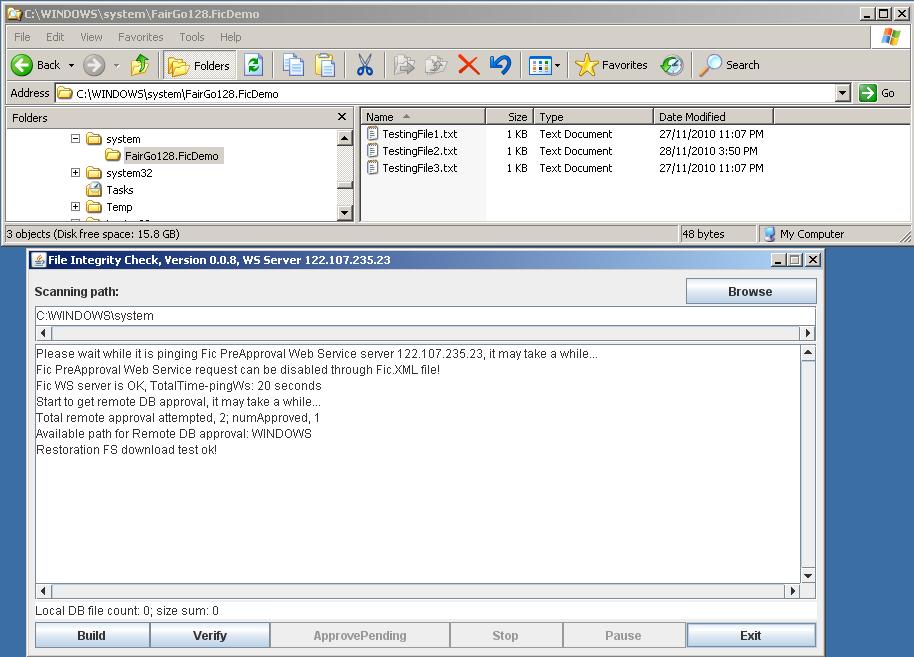
Computer trouble shooter can use Fic client application and databases to check and verify for their client's computer System File's integrity. Potentially, once the file changes are detected and identified, file replacement/restoration can be possible, once the proper backup file server is setup in place. Click here to see the File Restoration Use Case demonstrated.

Cooperate IT support can install Fic Server onto their Intranet and have their end user to use Fic client application, utilising the full Fic Service.

Anti-Malware research guys, you know what it is for, right?! When you are dis-assembling the unknown virus on a daily base, you may like to use Fic to make sure you do not get infected yourself.

In the Anti-Malware research and development lab environment, large VmWare images and snapshots would have been used, people sometimes may be reluctant to do Windows update for every VmWare image and snapshot. That will expose to vulnerability attack to all the PC within whole lab Intranet. Also people tent to disable Real Time AV protection because the nature of the work. So do a daily Fic scan will help to ensure your file system's integrity, against any vulnerability attack, especially the Zero-day attack.


Question 6: Can Fic be used for Web site protection?

Yes. Fic can protect any file system including files in the Web folder on the HTTP server.

Once any change is detected, Fic can send email alert to the administrator.

Question 7: Is Fic Cloud Aware? and how?

Yes. The Fic administrator issues signed PKI certificate for trust and technical capable entity/user in the Internet Cloud, so as to allow authorised user to upload the change for the Clean File Database in the Internet Cloud. A few voting algorithms can be applied to ensure the change request uploaded.

Once we have enough trust entity/user in the Cloud for Fic, we will be utilising the whole Internet Cloud to fight against the attacks.

With Fic's effective security (PKI) certificates for Fic servers and users, the identity of the trust entities/users can be ensured.

Go To Top Go To Top

Fic Stand Alone User

Stand Alone User can use this program for free, to build a local database and check their File System's Integrity on a daily base, and get the alert once any file changes.

Stand Alone User can not check the remote database on the internet.

Go To Top Go To Top

Fic Registered User

The registered user can utilise the remote database on the Internet.

Go To Top Go To Top

Fic Full Service User

The full user can have us to set up the Fic Server on their Intranet. That will make the Fic client application work much more effectively, utilising the Remote Database on their own Intranet. Also File Restoration functionality can be used!

Go To Top Go To Top

Technical Services

We have experties in Computer and Network installation and trouble shooting to hire. Experties:

Windows/Linux/Unix/MAC/VMWare/ESX

Dell/Sun/HP servers and clustering disk arrays

Memory coredump (postmortem) analysis/debug/WinDbg/Process Monitor

Anti-malware and security application development, QA and support

Go To Top Go To Top

Developer Services

We have software developers to hire. Experties:

Java/C++/C, Eclipse/MSVS/gcc/CodeWarrior/Watcom

SVN/CVS/VSS/PVCS, Bugzilla, SDLC/TDD

OO Design Patterns, Mix-language programming/architecture

Multi-Thread/Multi-Processors programming/architecture/test

J2SE/J2EE/JavaCC/JAX-WS/WSIT/JNLP

Swing/SWT/Applet/Servlet/JSP/JNI/JUNIT

HTML/XML/JAXB/XSLT/ANT/LinuxScripts/VbScripts

MySQL/H2/JDBC/EJB/Hibernate, GlassFish/Apache/Tomcat/Spring/IIS

TCP/IP, DNS/DHCP/SLP/NIS, IDM/eDirectory(NDS)/Samba/LDAP, PKI/SSO/Kerberos/SSH

Automatic software test strategy and procedure development, STAF, Selenium, QTP

Mocking Framework and Agile Development Capability

Go To Top Go To Top

Download Version 0.0.9

To download Fic.msi for Windows 32bit OS: Fic.msi

MD5: aa10874fc7333a4407815dc8d10b5871

To download Fic64.msi for Windows 64bit OS: Fic64.msi

MD5: 30ef49b02a23f0ad153b8c53f5a88ce3

To download Fic.jar: Fic.jar

MD5: 480470cae76d10d9c91bd0c805cf932e

Known issue: some Internet like MS IE8 may automatically rename the Fic.jar to Fic.zip while downloading. Please rename it back to Fic.jar after donwload.

Source Code: Fic-Src.zip
MD5: abcd1234

Go To Top Go To Top

Install on Windows

Steps to run + test:

1. Double Click on the donwloaded file Fic.msi. By default the Fic.jar file will be installed to C:\Fic folder. And the JRE will be also installed on the way.

2. Double Click on C:\Fic\Fic.jar. You will get the application running. Or run command: java -Duser.dir=C:\Fic -jar c:\Fic\Fic.jar

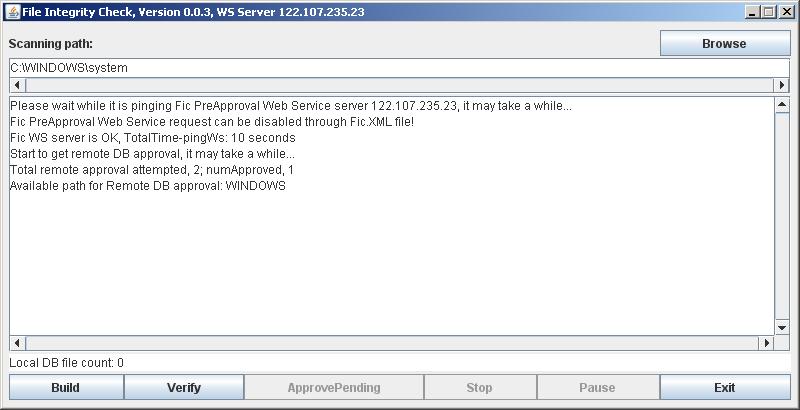
3. Click on Verify or Build button, you will see something going on.

Alternatively, you may like to follow the test steps: UseCase on Windows

4. Please Note:

We have a Web Service Server running at 122.107.235.23 host using port 8088. So, please make sure your firewall NOT to block this port.

The Web Service contains PreApproval service for SystemDrive:\Windows folder. i.e. you can use my Web Service to PreApprove the SystemDrive:\Windows change.

The Web Service Client/Server communication has been coded with a very secure channel.

Go To Top Go To Top

Install on Windows - legacy

Steps to run + test:

0. Install JRE

From:
http://www.java.com/en/download/inc/windows_upgrade_ie.jsp

1. Put the Fic.jar file to C:\Fic folder.

2. Double Click on C:\Fic\Fic.jar. You will get the application running. Or run command: java -Duser.dir=C:\Fic -jar c:\Fic\Fic.jar

3. Click on Verify or Build button, you will see something going on.

Alternatively, you may like to follow the test steps: UseCase on Windows

4. Please Note:

We have a Web Service Server running at 122.107.235.23 host using port 8088. So, please make sure your firewall NOT to block this port.

The Web Service contains PreApproval service for SystemDrive:\Windows folder. i.e. you can use my Web Service to PreApprove the SystemDrive:\Windows change.

The Web Service Client/Server communication has been coded with a very secure channel.

Go To Top Go To Top

Use case on Windows

Steps to test and play:

0. Complete all the installation mentioned above. Install on Windows

1. Start the application. Leave the Scanning Path as it is - "C:\WINDOWS\system".


2. Click on the Build button. It will build the Local Database on this folder.

Click here to see the relevant screen.

3. Click on the Verify button. It will do the verification on this folder. You will get a final message "Nothing changed".

Click here to see the relevant screen.

4. Create a file "New Text Document.txt" in "C:\WINDOWS\system" folder.

5. Click on the Verify button. You will get an alert on the change - a new file added.

Click on the new file name on the FIC Alert Windows. You can see some detail of the file.

Click here to see the relevant screen.

6. Since it is not a problematic file, you can just Click on the check box of the new file, and Approve it into the Local Database.

7. Click on the Verify button. You will get message "Nothing changed".

8. Remove the folder "C:\Fic\Fic.WorkSpace", this will clean up all information created by Fic including the Local Database.

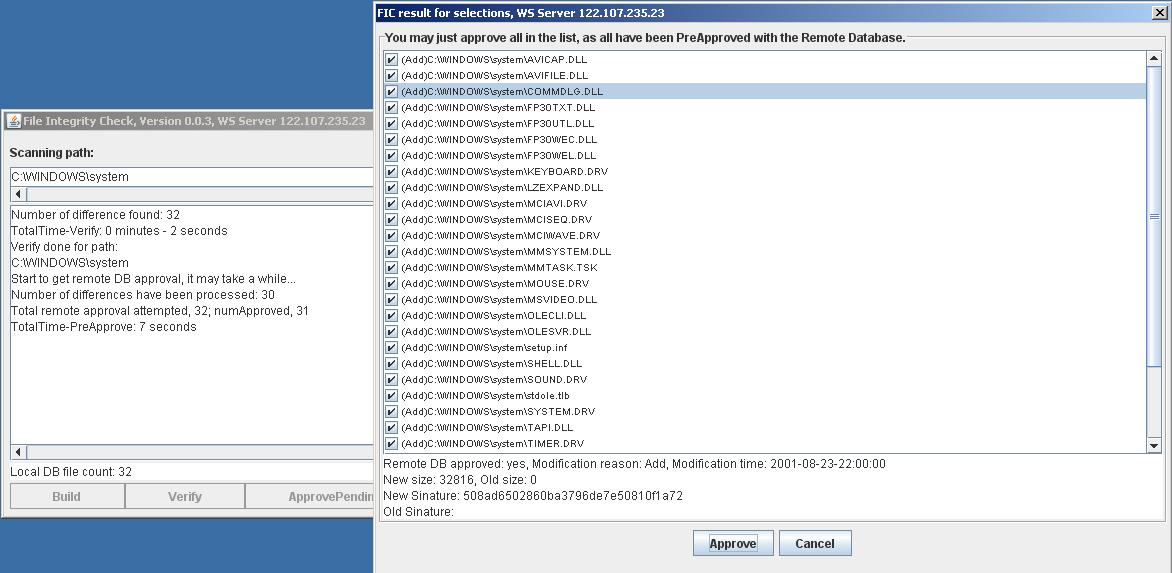
9. Click on the Verify button. It will do the verification on this folder. Because the Local DB has been remove, there will be a lots of differences alerted. So you will get a screen like below:

Click on on any of file name on the FIC Alert Windows. You can see some detail of the file. eg. "C:\WINDOWS\System\COMMDLG.DLL".


Since the Remote Database contain the relevant clean file signature, all the check boxes are checked automatically, so you can just approve it into the Local Database.

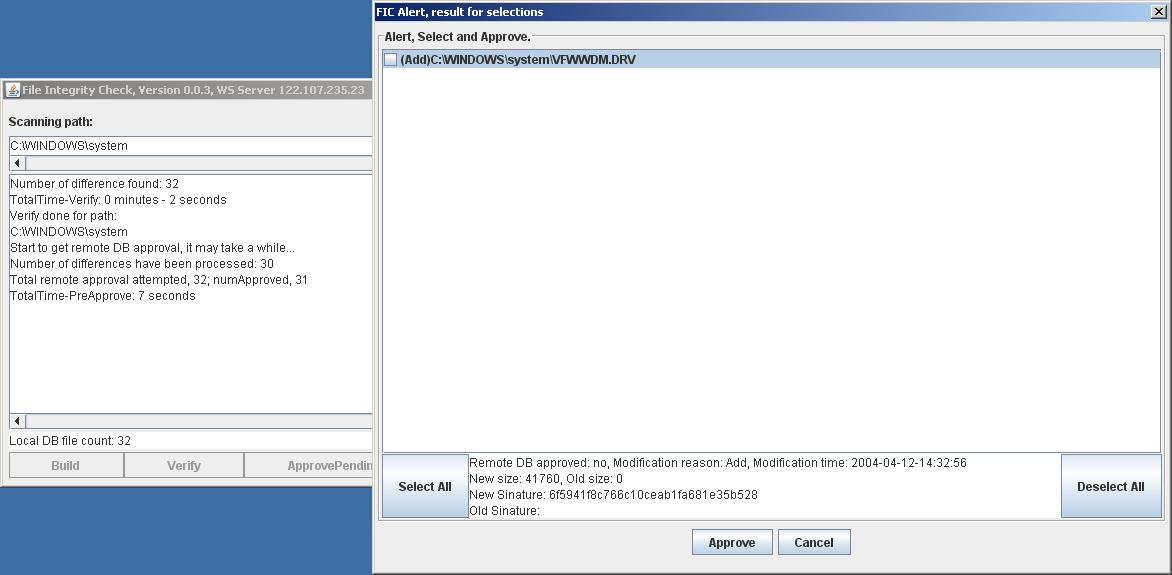
10. You may also get an Alert screen like below:


If the change is suspicious, then you have got what the Fic application is for now.

If you think the change is expected, then you can approve it into the Local Database.

Go To Top Go To Top

Advance Usecase on Windows - File Changes Restoration

Steps to test and play:

0. Complete all the installation mentioned above. Install on Windows. And put the 3 test files onto C:\WINDOWS\system\FairGo128.FicDemo folder. The 3 test files' content are just the file names. The test files can be downloaded from here.

1. Start the application. Leave the Scanning Path as it is - "C:\WINDOWS\system".


2. Click on the Build button. It will build the Local Database on this folder. Click here to see the relevant screen.

3. Change the TestingFile2.txt, and delete the TestingFile3.txt. Click here to see the relevant screen.

4. Click on the Verify button. You will get an alert on the 2 changes. Click here to see the relevant screen.

5. Click on the Cancel button. You will see the ApprovePending button becomes available. Click here to see the relevant screen.

6. Click on the ApprovePending button. You see the warning of the 2 changes. Click here to see the relevant screen.

7. Click on the Cancel button, as the 2 changes are unexpected. Click here to see the relevant screen.

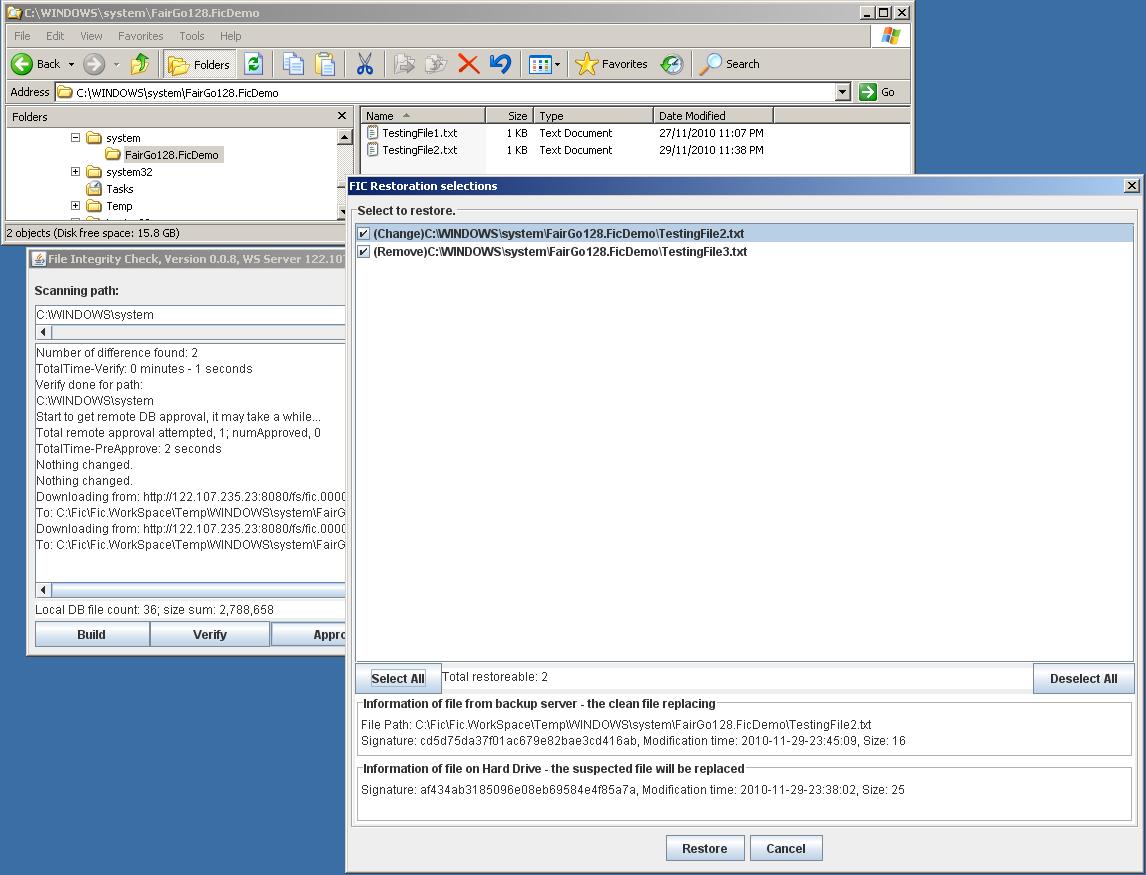
8. Now you will get the Restoration dialog. Because the 2 files are host on the Restoration File Server. So you will see 2 restore-able files.


9. Select the 2 files to restore by clicking the check boxes, or click the "Select All" button. Click here to see the relevant screen.

10. Click on the Restore button, and click "YES" at the confirmation dialog. You should notice the 2 files will have been restored.

11. Click on the Verify button. You will get a final message - "Nothing changed". That means everything has been restored. Click here to see the relevant screen.

Go To Top Go To Top

Test result on Windows:

Some Fic performance data FYI:

Computer used: HP mini laptop, WinXp32 SP3, 1.66GHz CPU, 1.99GB RAMS

Folders list involved:
"C:\WINDOWS"
"C:\Program Files"

Fic takes 15 minutes to build the Local DB, 11 minutes to do verify, 50 seconds to PreApprove 170 difference with the Remote DB.

Log records:

Total inserted in number: 48,172
Total calculated in size (byte): 7,888,572,829
TotalTime-Build: 15 minutes - 945 seconds
Build done for paths:
C:\WINDOWS
C:\Program Files

Number of difference found: 170
TotalTime-Verify: 11 minutes - 682 seconds
Verify done for path:
C:\WINDOWS
C:\Program Files

Start to get remote DB approval, it may take a while...
Number of differences have been processed: 30
...
Number of differences have been processed: 150
Total remote approval attempted, 170; numApproved, 0
TotalTime-PreApprove: 50 seconds

Please note: A few conditions + configuration can affect Fic's performance:

1. If you have Anti-Virus program installed and the RealTime protection is enabled, Fic may take more time to build and verify.

2. The total file size in the specified folder can affect Fic's performance too, because Fic may take more time to calculate the file signature.

Go To Top Go To Top

Install on Linux - Ubuntu:

Steps to run + test:

0. Install JRE

Quick note for installing and running JRE on Linux/ubuntu:
https://help.ubuntu.com/community/Java#Choosing the default Java to use

1. Put the Fic.jar file to /home/tester/Fic folder.

2. Click to run /home/tester/Fic.jar. You will get the application running. Or run command: java -Duser.dir=/home/tester/Fic -jar /home/tester/Fic.jar

3. Click on Verify or Build button, you will see something going on.

4. Please Note:

We have a Web Service running at 122.107.235.23 host using port 8088. So, please make sure your firewall NOT to block this port.

My Web Service contains PreApproval service for /bin folder. i.e. you can use my Web Service to PreApprove the /bin folder change.

The Web Service Client/Server communication has been coded with a very secure channel.

Go To Top Go To Top

Thanks for visiting!

Support@FairGo128.com